sandwich_shop
Flutter Course
This is the homepage for the Flutter Course which is the first half of the Programming Applications and Programming Languages (M30235) and User Experience Design and Implementation (M32605) modules. (It is called “sandwich_shop” because the worksheets build an app for a sandwich shop.)
Schedule
| Week Commencing | Week Ending | CMIS Week | Worksheet | Sign-off Deadline | Lecture Topics (ish!) |
|---|---|---|---|---|---|
| 29/09/2025 | 03/10/2025 | 9 | Worksheet 0 | GitHub intro | |
| 06/10/2025 | 10/10/2025 | 10 | Worksheet 1 | 0 | Flutter intro |
| 13/10/2025 | 17/10/2025 | 11 | Worksheet 2 | 0, 1 | Debugging and inspection |
| 20/10/2025 | 24/10/2025 | 12 | Worksheet 3 | 1, 2 | AI-Driven Development |
| 27/10/2025 | 31/10/2025 | 13 | Consolidation week | ||
| 03/11/2025 | 07/11/2025 | 14 | Worksheet 4 | 2, 3 | Coursework intro |
| 10/11/2025 | 14/11/2025 | 15 | Worksheet 5 | 3, 4 | Test-Driven Development |
| 17/11/2025 | 21/11/2025 | 16 | Worksheet 6 | 4, 5 | More AI-Driven Development |
| 24/11/2025 | 28/11/2025 | 17 | Worksheet 7 | 5, 6 | Persistence, Firebase |
| 01/12/2025 | 05/12/2025 | 18 | Worksheet 8 | 6, 7, Demo | Coursework support drop-in |
| 08/12/2025 | 12/12/2025 | 19 | None | 7, 8, Demo | Coursework support drop-in |
| 15/12/2025 | 19/12/2025 | 20 | None | 8, Demo | Coursework support drop-in |
| 22/12/2025 | 26/12/2025 | 21 | Xmas Vacation |
Teaching material
We only have worksheets for this part of the module. This is because there is no exam for this part of the module, so we do not have lecture slides.
You should aim to complete the worksheets in the order they are presented below. Do not skip Worksheet 0 and it is fine if you cannot make it all the way to Worksheet 8.
- Worksheet 0: Introduction to Dart, Git and GitHub
- Worksheet 1: Introduction to Flutter
- Worksheet 2: Stateless Widgets
- Worksheet 3: Stateful Widgets
- Worksheet 4: App Architecture, Testing, and README
- Worksheet 5: Data Models and Assets
- Worksheet 6: AI-Driven Development and Navigation
- Worksheet 7: State Management and Persistence
- Worksheet 8: Integration Testing, Firebase, and Deployment
Assessment
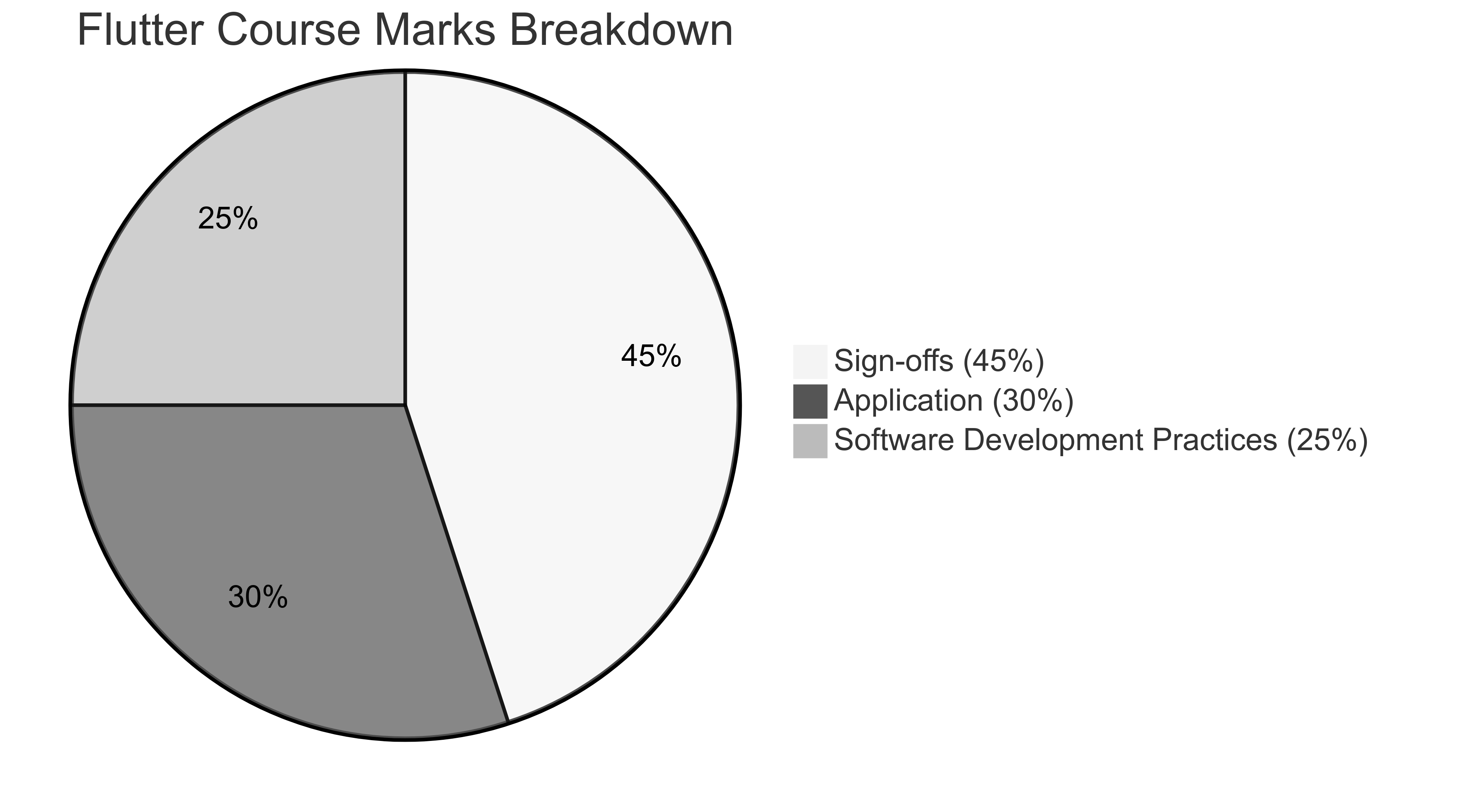
This part of the module which runs though Teaching Block 1 (TB1) is listed as Item 1 in the module specification. Item 1 is worth 50% of the overall module mark. Your mark for item 1 is made up of weekly sign-offs (45%) and a coursework (55%).
Sign-offs (45%)
Every worksheet ends with a handful of exercises. After completing these exercises, show a member of staff your work for a sign-off. Each sign-off is worth 5% of the Flutter Course mark.
There are a total of nine sign-offs (one for each worksheet), and you have a two-week window to get each sign-off and the deadlines are shown in the schedule above. You can complete sign-offs early if you wish.
Coursework (55%)
Use this link to access the coursework brief. The submission sections will open on Moodle soon and the on-time deadline for submission is 13:00 on Wednesday 3rd December 2025 (more information about late submissions can be found in the brief).
The mark for the coursework is made up of two components: the mark for the functionality of the application you are submitting (30%) and the mark for your software development practices used while developing this application (25%).
By software development practices, we are referring to the following: version control (GitHub), verification (testing), utilisation of cloud services (Firebase), and the application of AI tools (evidence of correct AI-driven development).
See the diagram below for a visual breakdown of the marks.
Referral/Deferral Assessment
More information about what referral/deferral are will be provided later in Moodle. Referral/deferral dates are on the University Key Dates page.
The referral/deferral assessment for this Flutter Course is a coursework that you need to complete during the referral/deferral period (see above). This coursework is not the same as the coursework linked above. It will be added to Moodle nearer the time.
Extenuating Circumstances
If there are external reasons stopping you from engaging with the module, submit an Extenuating Circumstances Form (ECF) as soon as you can and notify me when your ECF is approved.
Note that ECFs apply to the whole Item 1 (the entire Flutter Course, 50% of the module). You cannot use an ECF just for individual sign-offs.
Also note that if your ECF is approved, any sign-offs you already have will not be counted. Instead, you will be expected to take the deferral assessment in July and your Item 1 mark will come from that deferral coursework alone (not from the original coursework or sign-offs).
If you do not have an ECF or it is not approved, you will receive all the sign-offs you have completed and your coursework mark depending on when you submit it (with late penalties if applicable).
Getting help
To get support with the worksheets, join the Discord channel and ask your questions there. Otherwise, attend your timetabled session and ask a member of staff for help.
Feedback
To provide feedback on the organisation of the Flutter part of the module, complete this anonymous feedback form. Note that you need to be logged into Microsoft with your student account to be able to access the form, but your username will not be collected.
If you notice any mistakes or would like any improvements, please open the repository, go to the Issues tab and open a new issue describing the mistake. Provide as much detail as possible so that we can fix it quickly.
Sign-offs Tracker
This Excel sheet allows you to track which sign-offs you have completed. Search for your UP number with Ctrl + F or ⌘ + F to find your row quickly. If you cannot find your UP number, please let me know by messaging me on Discord.